Macro Excel
Comment reprendre les dernières déclarations de la DevBox-Sante dans le plan de test.
Préambule
Cette macro est donnée à titre d’information. Nous n’assurons pas de maintenances sur cette dernière. Nous sommes toutefois à l’écoute de toutes corrections et améliorations.Le Plan de test est un fichier Excel, le plus simple est donc de définir une macro VB pour récupérer les dernières réponses aux exigences directement sur ce site.
Pour cela il faut tout d’abord activer les macros du fichier contenant le plan de test :
-
Sauvegarder le fichier au format
Classeur Excel prenant en charge les macros (*.xlsm) -
Dans
Fichier\Options\Centre de gestion de la confidentialité\Paramètres du Centre de gestion de la confidentialité\Paramètres des macroscocher (temporairement) :☑ Activer toutes les macros
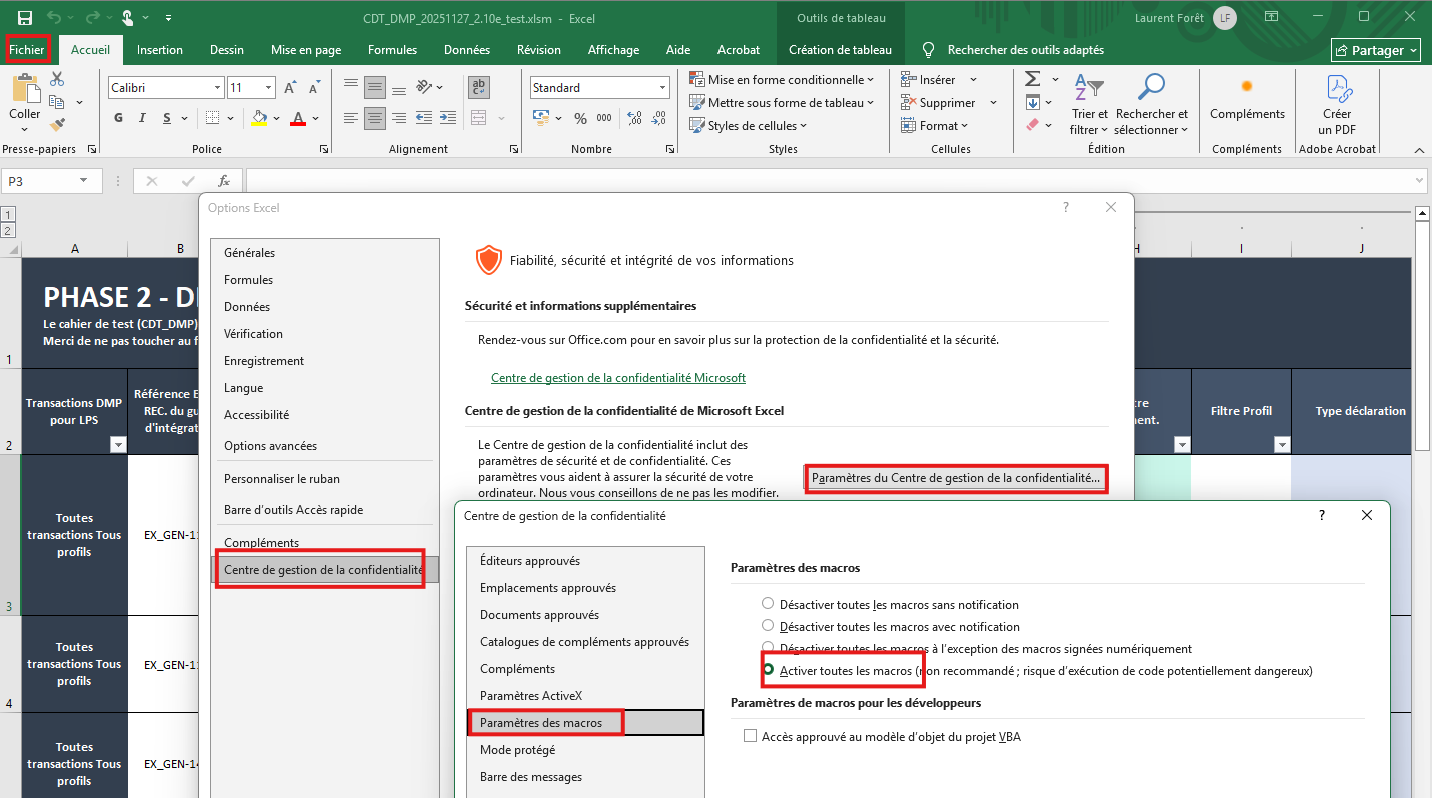
Une fois les macros activées :
-
Aller dans l’éditeur VB (Alt + F11),
-
Ajouter la librairie HTML (Outils/References/Microsoft HTML Object Library)
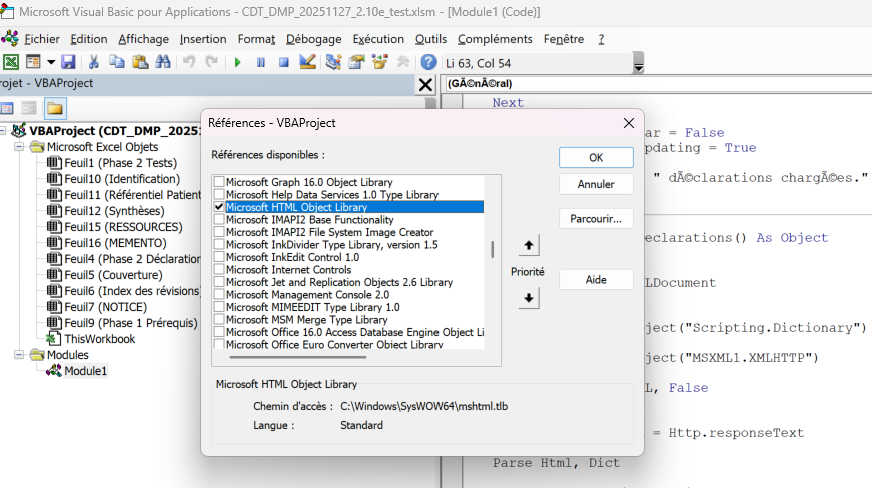
-
importer le module VB à partir du script suivant :
Option Explicit

Private Const URL As String = "https://doc.devbox-sante.fr/7.x/devbox-sante/connecteurs/dmp/howtos/homologation/phase_2/declarations/"

Public Sub MajDeclarations()
   Dim Dict As Object
   Dim ws As Worksheet
   Dim colonneReference As Long
   Dim colonneDeclaration As Long
   Dim l As Long
   Dim ref As String

   Application.ScreenUpdating = False
   Application.StatusBar = "Telechargement des declarations..."

   Set Dict = LoadDeclarations()
   Set ws = ActiveSheet
   colonneReference = 2
   colonneDeclaration = 16

   For l = 1 To ws.Cells(ws.Rows.Count, colonneReference).End(xlUp).Row

       ref = Trim(ws.Cells(l, colonneReference).Value)

       If Dict.Exists(ref) Then
           ws.Cells(l, colonneDeclaration).Value = Dict(ref)
       Else
           ws.Cells(l, colonneDeclaration).Value = ""
       End If

       Application.StatusBar = "Ligne " & l

   Next

   Application.StatusBar = False
   Application.ScreenUpdating = True

   MsgBox Dict.Count & " declarations chargees."
End Sub

Private Function LoadDeclarations() As Object
   Dim Http As Object
   Dim Html As New HTMLDocument
   Dim Dict As Object

   Set Dict = CreateObject("Scripting.Dictionary")
   Set Http = CreateObject("MSXML2.XMLHTTP")

   Http.Open "GET", URL, False
   Http.send

   Html.body.innerHTML = Http.responseText

   Parse Html, Dict

   Set LoadDeclarations = Dict
End Function

Private Sub Parse(doc As HTMLDocument, Dict As Object)
   Dim h As Object
   Dim ref As String
   Dim txt As String

   For Each h In doc.getElementsByTagName("h2")
       If h Is Nothing Then
          Exit For
       End If

       ref = Trim(h.innerText)

       If UCase(Left(ref, 3)) = "EX_" Or UCase(Left(ref, 4)) = "REC_" Then

           txt = ReadDeclaration(h)

           If txt <> "" Then
               Dict(ref) = txt
           End If
       End If
   Next
End Sub

Private Function ReadDeclaration(h1 As Object) As String
   Dim n As Object
   Dim txt As String
   Dim ok As Boolean

   On Error GoTo Erreur

   If h1 Is Nothing Then
    Exit Function
   End If

   Set n = h1.NextSibling
   txt = ""

   Do While Not n Is Nothing

       If n Is Nothing Then
          Exit Do
       End If

       If LCase(n.nodeName) = "h1" Then Exit Do

       If LCase(n.nodeName) Like "h[3-6]" Then

           If InStr(1, n.innerText, "claration", vbTextCompare) > 0 Then
               ok = True
           ElseIf ok Then
               Exit Do
           End If

       ElseIf ok Then
           txt = txt & FormatHTMLNode(n)
       End If

       If Not n Is Nothing Then
           Set n = n.NextSibling
       Else
           Exit Do
       End If
   Loop

   ReadDeclaration = Trim(txt)
   Exit Function

Erreur:
       MsgBox "Erreur " & Err.Number & vbCrLf & _
          Err.Description & vbCrLf & _
          "Dans ReadDeclaration"
End Function

Private Function FormatHTMLNode(n As Object) As String
   Dim s As String
   Dim nodeName As String

   On Error Resume Next

   nodeName = n.nodeName

   Select Case LCase(nodeName)
       Case "p"
           s = n.innerText & vbCrLf & vbCrLf
       Case "li"
           s = "- " & n.innerText & vbCrLf
       Case "ul", "ol"
           s = n.innerText & vbCrLf
       Case "table"
           s = n.innerText & vbCrLf & vbCrLf
       Case "h2"
           s = ""
       Case Else
           s = n.innerText & vbCrLf
   End Select

   On Error GoTo -1

   FormatHTMLNode = s
End Function
- Aller dans la feuille
Phase 2 Déclarationset exécuter la macroMajDeclarations(Alt + F8)
Attention
Toutes les déclarations du fichier seront écrasés.- Enregistrer le fichier au format .xlsx